
Template #4386 — Notion status-based alert messages
Matty Reed's workflow: Notion Trigger + Switch routes Status values to Slack, Telegram, WhatsApp, Discord, and Email. Start here to see the four-node chain in a working form before you adapt it.

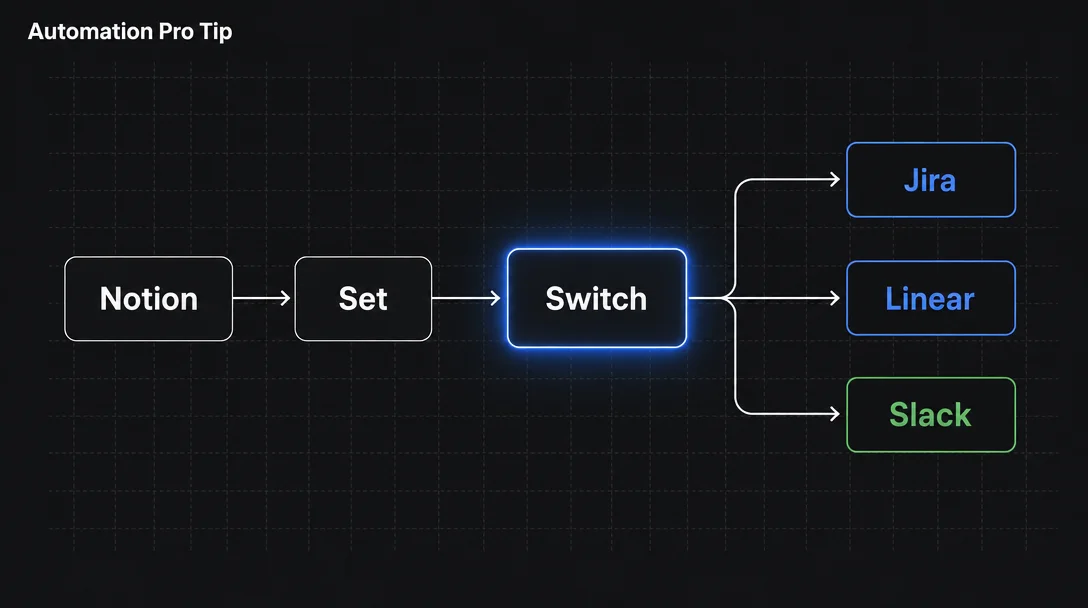
A four-node n8n chain — Notion Trigger → Set → Switch → action nodes — routes new or updated Notion database rows to Jira, Linear, or Slack based on a property value. The key non-obvious step is a Set node that flattens Notion's nested JSON before the Switch conditions fire. Built from templates #4386 and #14120; includes credential setup for all three tools, an optional closed-loop write-back to Notion, and an honest rundown of the Notion Trigger's active beta bugs.

| Requirement | Details |
|---|---|
| Notion plan | Free or above (Public API access on all plans) |
| n8n plan | Any — including self-hosted Community Edition (free) |
| Notion Internal Integration | Created at notion.com/my-integrations; needs Read, Update, Insert content permissions 3 |
| Notion database shared with integration | Via Connections → Connect to in your database settings |
| n8n credentials | Jira API Token, Linear Personal API Key, and/or Slack OAuth2 — depending on your target tools |
$json.status; it lives at $json.properties.Status.select.name. 4 The Switch node can't match against that path directly without extra configuration.{{$json.status}} against a string value. 5 This one-node flattening step is the non-obvious part of the pattern — skip it and your Switch conditions will never match.status = "Bug" and routes to the Jira node, rule 2 matches status = "Feature Request" and routes to the Linear node, rule 3 matches status = "Alert" and routes to the Slack node. Rows that match no rule go to the Fallback Output (set to "Extra Output" to keep them visible) rather than silently disappearing.Notion Trigger (polls every minute or receives webhook push)
↓
Set node — flatten: $json.properties.Status.select.name → $json.status
$json.properties.Name.title[0].plain_text → $json.title
$json.id → $json.pageId
↓
Switch node (Rules mode, String "is equal to")
├── Rule 1: status = "Bug" → Jira node (Create Issue)
├── Rule 2: status = "Feature Request" → Linear node (Create Issue)
└── Rule 3: status = "Alert" → Slack node (Send Message)4386 in your n8n template library or open n8n.io/workflows/4386 and click Use workflow. Once imported, open the canvas. You'll see the Notion Trigger, a Set node labeled "Set Notion Page Info", a Switch node labeled "Status router", and a set of message-sending branches. 5Output field: status
Expression: {{$json.properties.Status.select.name}}Output field: title
Expression: {{$json.properties["Task Name"].title[0].plain_text}}Output field: pageUrl
Expression: https://notion.so/{{$json.id.replace(/-/g, "")}}| Rule | Field | Condition | Value | Output |
|---|---|---|---|---|
| 1 | {{$json.status}} | String — is equal to | Bug | → Jira |
| 2 | {{$json.status}} | String — is equal to | Feature Request | → Linear |
| 3 | {{$json.status}} | String — is equal to | Alert | → Slack |
Summary to {{$json.title}}, add a Description that includes {{$json.pageUrl}}. 8{{$json.title}}. 9chat:write scope). Set Channel to your Slack channel ID, Text to {{$json.title}} — {{$json.pageUrl}}. 10{{$json.pageId}} → update your Status property to "Processed".{}). If you have an errorWorkflow configured, it fires every minute with "Error: No error message." 13 Workaround: don't attach an errorWorkflow to this trigger while the bug is open.WorkflowActivationError: "this is not a Date object." on the first poll. A one-line fix exists in the community but hasn't been merged. 15{{$json.title}} is not empty before routing. 16Matty Reed's workflow: Notion Trigger + Switch routes Status values to Slack, Telegram, WhatsApp, Discord, and Email. Start here to see the four-node chain in a working form before you adapt it.
Yassin Zehar's PM-built workflow routes four Notion status values to Gmail, Slack, and Jira — and writes 'Processed' back to the Notion row for a full audit trail. Study the closed-loop Notion Update node at the end.
Full reference for Rules mode vs. Expression mode, all supported data types (String, Number, Date, Boolean, Array, Object), Fallback Output options, and the 'Send to all matching outputs' toggle.
Add more perspectives or context around this Drop.